VI
VIViewer
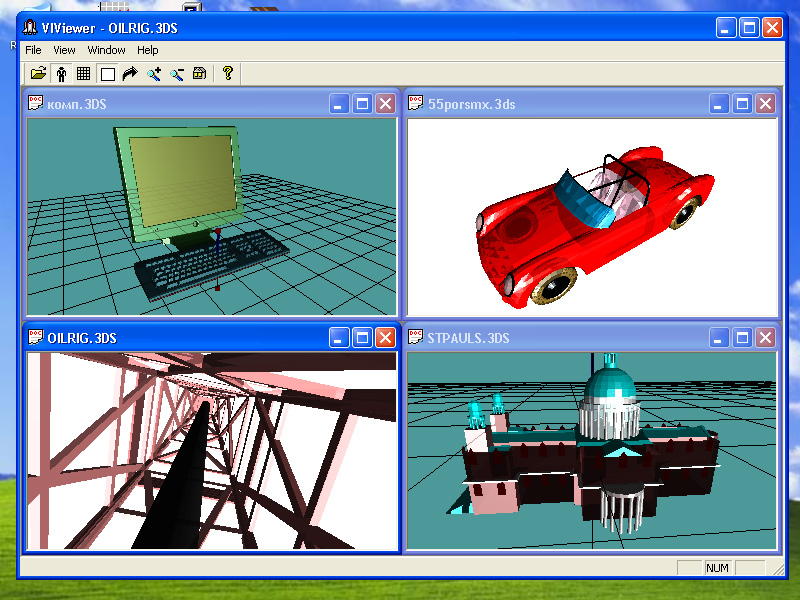
v1.1The Viewer for 3ds files with possibility to walk around objects. - You can open a lot of 3ds files together. - You can scale and rotate the 3ds-objects. - You can walk around and inside the 3ds-objects. - Simply use 4 arrow buttons for rotate or walk around the object. - Use "plus" and "minus" buttons on numpad for scale the object. - Use "Man" button on toolbar for switching "walk" or "look" mode.
Description
The Viewer for 3ds files with possibility to walk around objects. - You can open a lot of 3ds files together.
- You can scale and rotate the 3ds-objects. - You can walk around and inside the 3ds-objects.
- Simply use 4 arrow buttons for rotate or walk around the object. - Use "plus" and "minus" buttons on numpad for scale the object.
- Use "Man" button on toolbar for switching "walk" or "look" mode. Usefull Keyboard buttons: Home - for look from start (home) point (also 5 on numpad) + - on numpad for more zoom (zoom in) - - on numpad for less zoom (zoom out) R - autorotate the object (on / off) W - white background (on / off) N - coordinate net (on / off) A - coordinate axies (on / off) 9 - on numpad for increase rotation speed 3 - on numpad for decrease rotation speed "Look" mode: Left arrow - rotate the scene to left Right arrow - rotate the scene to right Up arrow - rotate the scene forwards.
Down arrow - rotate the scene backwards. "Walk" mode: Left arrow - turn to left (also 4 on numpad) Right arrow - turn to right (also 6 on numpad) Up arrow - go forward.
Down arrow - go back. Shift + Left arrow - shift to left Shift + Right arrow - shift to right Shift + Up arrow - rise upwards (also Page Up) Shift + Down arrow - lowered downwards (also Page Down ) Ctrl + Shift + Arrows - move slowly.
Ctrl + Up arrow - bend forward (also 8 on numpad) Ctrl + Down arrow - bend backward (also 2 on numpad) F2 - look forward. You can use VIViewer for viewing "single" 3ds files, without additional files (textures etc).
For acceleration of walking, representation of 3ds files is lowered.
- You can scale and rotate the 3ds-objects. - You can walk around and inside the 3ds-objects.
- Simply use 4 arrow buttons for rotate or walk around the object. - Use "plus" and "minus" buttons on numpad for scale the object.
- Use "Man" button on toolbar for switching "walk" or "look" mode. Usefull Keyboard buttons: Home - for look from start (home) point (also 5 on numpad) + - on numpad for more zoom (zoom in) - - on numpad for less zoom (zoom out) R - autorotate the object (on / off) W - white background (on / off) N - coordinate net (on / off) A - coordinate axies (on / off) 9 - on numpad for increase rotation speed 3 - on numpad for decrease rotation speed "Look" mode: Left arrow - rotate the scene to left Right arrow - rotate the scene to right Up arrow - rotate the scene forwards.
Down arrow - rotate the scene backwards. "Walk" mode: Left arrow - turn to left (also 4 on numpad) Right arrow - turn to right (also 6 on numpad) Up arrow - go forward.
Down arrow - go back. Shift + Left arrow - shift to left Shift + Right arrow - shift to right Shift + Up arrow - rise upwards (also Page Up) Shift + Down arrow - lowered downwards (also Page Down ) Ctrl + Shift + Arrows - move slowly.
Ctrl + Up arrow - bend forward (also 8 on numpad) Ctrl + Down arrow - bend backward (also 2 on numpad) F2 - look forward. You can use VIViewer for viewing "single" 3ds files, without additional files (textures etc).
For acceleration of walking, representation of 3ds files is lowered.