VI
VIPlanet
v1.0- all cities of the world (with a population more then 1000) - additionally detailed geodata (small villages, hotels...
Description
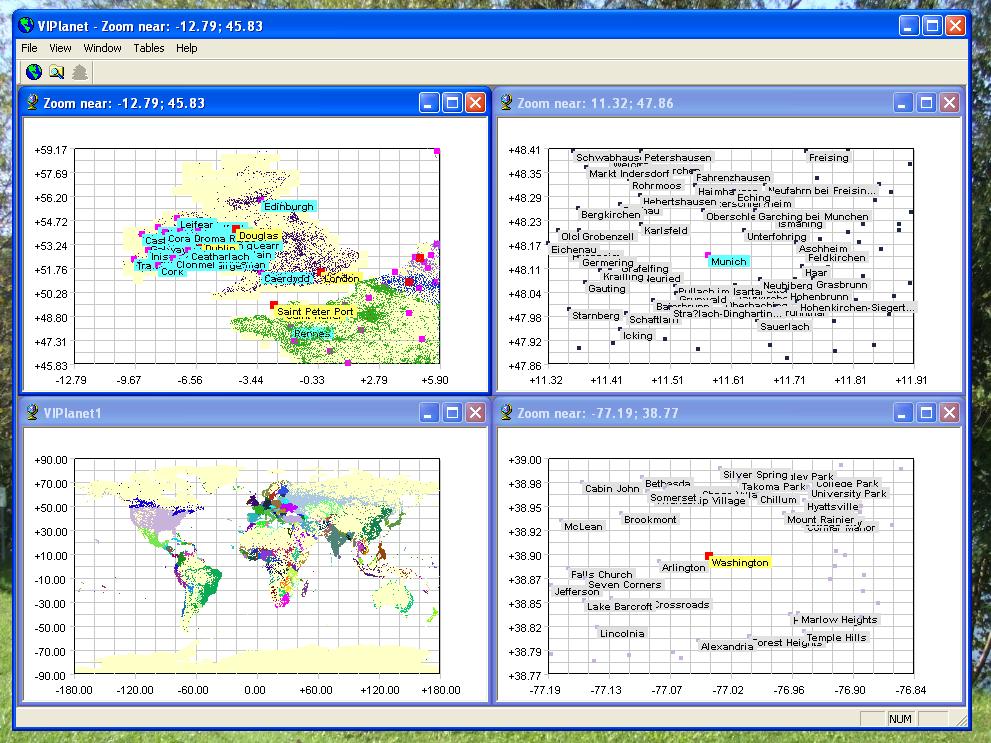
- all cities of the world (with a population more then 1000) - additionally detailed geodata (small villages, hotels etc) for one country - possibility to show only special things (for example only hotels) - possibility to find all records containing any phrase - possibility to add your big memo-text for every city or country - possibility to show any city with your text-label - possibility to change a city's text-label at any future date Quick start: - start VIPlanet - press a button "Find data" - input for example "Paris" - a new table with all records containing word "Paris" will be open - double click at any of rows in the table - you will see a dialog with an info about selected city. You can enter a big memo-text for this city - press a button "Point".
You will see a dialog for a point of this city at the map. - You can input a text with a spacial font and background color.
This text will be shown near this city at the map. - You can input a new text, that will be shown after spacial date (possible flashing) - press a button "Info" near the country name.
- you will see a dialog with an info about country. You can enter a big memo-text for this country How to see only special things from detailed geodata (for example only hotels) at the map: - start VIPlanet - drag a rectangle (using mouse), containing for example a part of Austria at the map - close all other opened maps - open the table "Feature codes" (menu "Tables") - use menu Window / Tile to place two windows (map and table) tiled - select in the table the rows you want to see at the map (for ex.
"a primary administrative division of a country" or "a building providing lodging and/or meals for the public" for hotels) - press a button "Refresh map" - you can select a lot of rows in the table together
You will see a dialog for a point of this city at the map. - You can input a text with a spacial font and background color.
This text will be shown near this city at the map. - You can input a new text, that will be shown after spacial date (possible flashing) - press a button "Info" near the country name.
- you will see a dialog with an info about country. You can enter a big memo-text for this country How to see only special things from detailed geodata (for example only hotels) at the map: - start VIPlanet - drag a rectangle (using mouse), containing for example a part of Austria at the map - close all other opened maps - open the table "Feature codes" (menu "Tables") - use menu Window / Tile to place two windows (map and table) tiled - select in the table the rows you want to see at the map (for ex.
"a primary administrative division of a country" or "a building providing lodging and/or meals for the public" for hotels) - press a button "Refresh map" - you can select a lot of rows in the table together