TS
Touch Screen Keyboard
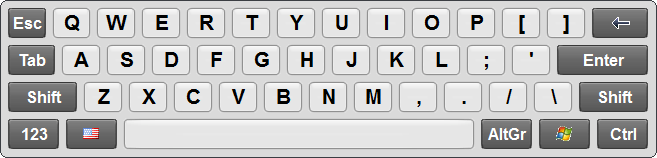
v8.5Touch Screen Keyboard was developed especially for touch screen devices: touch screen monitors, stationary e-kiosks, tablets and others. Touch Screen Keyboard has two main layouts that can be quickly switched using a special button. If you touch a key on a screen, you will see a small tooltip window with the corresponding character in the area not covered with your finger. Windows 7 users will like the support of the multi-touch technology.
Description
Touch Screen Keyboard was developed especially for touch screen devices: touch screen monitors, stationary e-kiosks, tablets and others. Touch Screen Keyboard has two main layouts that can be quickly switched using a special button: alphabetic and alpha-numeric.
If you press a key on a touch screen, you will see a small tooltip window with the corresponding character in the area not covered with your finger. Windows 7 users will like the support of the multi-touch technology.
To use Touch Screen Keyboard simply touch the keys of the on-screen keyboard and each keypress will be sent to the active application. It works seamlessly with all standard Windows applications allowing you to type virtually anywhere a hardware keyboard can be used.
Also you can design your own touchscreen keyboard, or use any of the 70 keyboard layouts included in the installation package.
If you press a key on a touch screen, you will see a small tooltip window with the corresponding character in the area not covered with your finger. Windows 7 users will like the support of the multi-touch technology.
To use Touch Screen Keyboard simply touch the keys of the on-screen keyboard and each keypress will be sent to the active application. It works seamlessly with all standard Windows applications allowing you to type virtually anywhere a hardware keyboard can be used.
Also you can design your own touchscreen keyboard, or use any of the 70 keyboard layouts included in the installation package.
File Size
3.82 MB
License
Shareware $29.95
Latest Update
09 Feb 2017
Publisher
Comfort Software Group