SP
SpacemouseCursorTool
v1.6This tool maps the movement of a spacemouse, spaceball, spacenavigator or similar 3D input device to cursor keys (up,down,left,right) as well as other keys including extra keys and mouse buttons. Up to 128 keys can be assigned. Great for scrolling around in the internet browser or similar tools without using a keyboard, may also be handy for games which do not support the spacemouse directly. Key combinations are supported.
Description
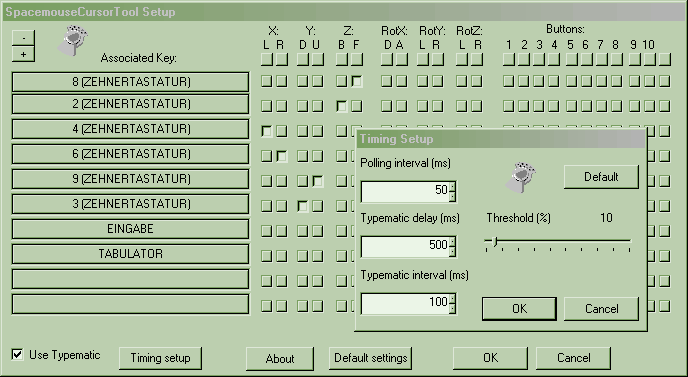
This tool maps the movement of a spacemouse, spaceball, spacenavigator or similar 3D input device to cursor keys (up,down,left,right) as well as other keys including extra keys and mouse buttons. Up to 128 keys can be assigned.
Great for scrolling around in the internet browser or similar tools without using a keyboard, may also be handy for games which do not support the spacemouse directly. Key combinations are supported.
The taskbar icon shows the state of the tool. If the joystick symbol is crossed red, the spacemouse is not installed or connected properly.
Double-click the icon to close down the tool. System requirements: Spacemouse, spaceball or similar 3D input devices with installed 3DxWare driver, Windows95/98/ME/2000/XP
Great for scrolling around in the internet browser or similar tools without using a keyboard, may also be handy for games which do not support the spacemouse directly. Key combinations are supported.
The taskbar icon shows the state of the tool. If the joystick symbol is crossed red, the spacemouse is not installed or connected properly.
Double-click the icon to close down the tool. System requirements: Spacemouse, spaceball or similar 3D input devices with installed 3DxWare driver, Windows95/98/ME/2000/XP
File Size
0.05 MB
License
Shareware $0.00
Latest Update
10 Jun 2009
Publisher
Tibor