PS
Presentation Screen Master
v2.0.0Using Presentation Screen Master is a great way to do the private works in one computer (your laptop, for example), while your audience views part of the screen on a different monitor (projector). You can present only selected area of the screen or an application on your computer, viewers will not be able to see any other content on your desktop. It also allows you to zoom in, annotate, and add a cursor effect on the presenting content.
Description
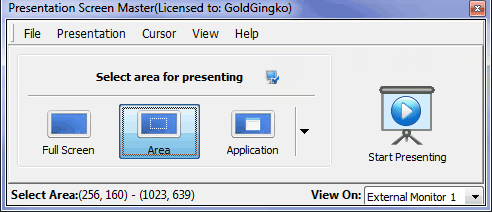
Using Presentation Screen Master is a great way to do the private works in one computer (your laptop, for example), while your audience views part of the screen on a different monitor (projected on a larger screen, for example). Presentation Screen Master offers the following tools to make it easier for you to present screen content: 1 You can present only selected area of the screen.
Viewers will not be able to see any other content outside the area. 2 You can present an application on your computer.
Viewers will not be able to see any other content on your desktop. For example if you?re presenting a Microsoft Word document and an IM message popped up, viewers would not see the IM message.
3 You can pause the screen presenting and then resume when you need to do some private work. 4 You can zoom in or out the presenting content.
5 You can annotate on the presenting. 6 You can add a cursor effect on the presenting.
Viewers will not be able to see any other content outside the area. 2 You can present an application on your computer.
Viewers will not be able to see any other content on your desktop. For example if you?re presenting a Microsoft Word document and an IM message popped up, viewers would not see the IM message.
3 You can pause the screen presenting and then resume when you need to do some private work. 4 You can zoom in or out the presenting content.
5 You can annotate on the presenting. 6 You can add a cursor effect on the presenting.