Description
Newport Software NSWatch provides a quick and easy way to monitor your children's computer activity. Easy to use software provides real-time screen snapshots and activity logs.
Computer activity can be viewed using Internet Explorer. A free trial version is available.
Features: Monitors activity on a computer. Screen snapshots show real-time images of activity on a computer.
Activity log tracks the in-use applications. Configuration program controls which users are monitored.
Access to activity information using Internet Explorer. Activity information can be viewed from any computer on your network.
Details: Using Internet Explorer, it is easy to view the activity on your computer. The main activity page shows a summary of the activity on the computer including user names, last screen snapshot time, number of captured images, and the last activity time.
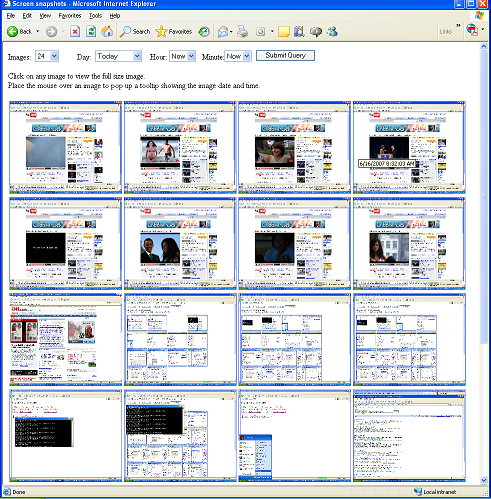
Clicking on a "last snapshot" link will display small images of recent screen snapshots from the monitored computer. Each snapshot can be expanded to a full size image by clicking on the snapshot.
Search criteria can be specified on the page to change the number of displayed images and the date/time of the displayed images. An activity log shows recent activity on the monitored computer.
The activity log includes the date/time, program that was running on the monitored computer, and the title of the window which was active. Requirements: · Windows XP SP2.
· Internet Explorer 6.0. · Microsoft .Net Framework.
Computer activity can be viewed using Internet Explorer. A free trial version is available.
Features: Monitors activity on a computer. Screen snapshots show real-time images of activity on a computer.
Activity log tracks the in-use applications. Configuration program controls which users are monitored.
Access to activity information using Internet Explorer. Activity information can be viewed from any computer on your network.
Details: Using Internet Explorer, it is easy to view the activity on your computer. The main activity page shows a summary of the activity on the computer including user names, last screen snapshot time, number of captured images, and the last activity time.
Clicking on a "last snapshot" link will display small images of recent screen snapshots from the monitored computer. Each snapshot can be expanded to a full size image by clicking on the snapshot.
Search criteria can be specified on the page to change the number of displayed images and the date/time of the displayed images. An activity log shows recent activity on the monitored computer.
The activity log includes the date/time, program that was running on the monitored computer, and the title of the window which was active. Requirements: · Windows XP SP2.
· Internet Explorer 6.0. · Microsoft .Net Framework.