KA
KO Approach
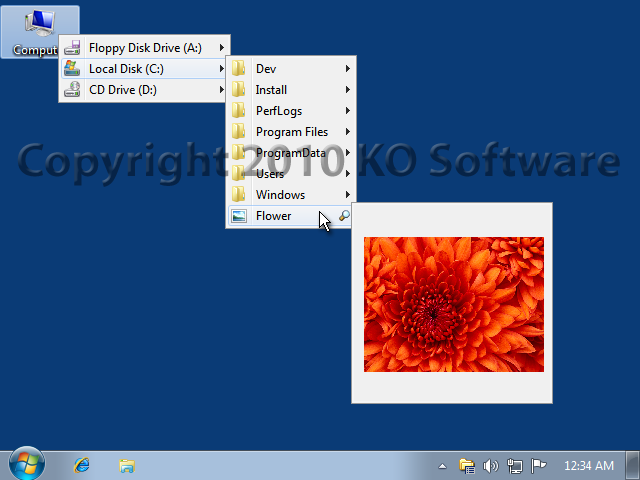
v0.5.2This shell enhancement allows you to access your files quicker. Click on a folder icon, hold mouse button pressed for a while, and a menu will appear displaying the folder's contents. Navigate this menu and its submenus, and locate even a deeply buried file. CTRL+click the title bar of any Explorer window and browser the entire hierarchy. The two included plug-ins enables previewing graphics files and playing pack WAV sounds right from the menu!
Description
This shell enhancement allows you to access your files quicker. Just click on a folder icon in Windows Explorer, hold mouse button pressed for a while, and a menu will appear displaying the folder's contents.
Navigate this menu and its sub-menus, and locate even a deeply buried file. Quickly browse the entirety of the Parent folder by CTRL+clicking the title bar of any Explorer window.
Click the program's Tray Icon to instantly access your favorite items via a customizable menu. A list of recent Run commands can also be displayed.
The included plug-in modules enable previewing graphics files of most popular formats (GIF, JPEG, TIFF, BMP, PCX, PNG), previewing text files, as well as playing back WAV sounds. Another plug-in extends Contextual Menus.
With additional commands you can copy to clipboard the path to the selected file or shortcut target. For directories, you can copy the full directory listing.
Navigate this menu and its sub-menus, and locate even a deeply buried file. Quickly browse the entirety of the Parent folder by CTRL+clicking the title bar of any Explorer window.
Click the program's Tray Icon to instantly access your favorite items via a customizable menu. A list of recent Run commands can also be displayed.
The included plug-in modules enable previewing graphics files of most popular formats (GIF, JPEG, TIFF, BMP, PCX, PNG), previewing text files, as well as playing back WAV sounds. Another plug-in extends Contextual Menus.
With additional commands you can copy to clipboard the path to the selected file or shortcut target. For directories, you can copy the full directory listing.
File Size
0.77 MB
License
Shareware $19.95
Latest Update
25 Jul 2007
Publisher
Kirill Osipov