ID
ImTOO DVD Copy
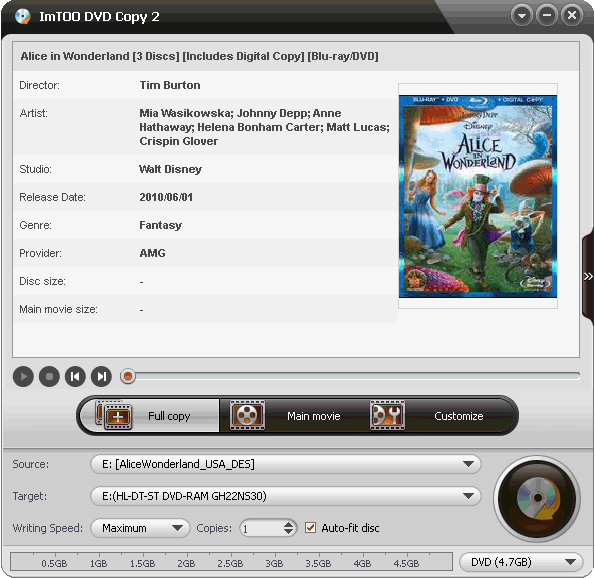
v2.0.1.0831Stable, fast and easy-to-use DVD copying software for you! ImTOO DVD Copy can copy DVD movie to DVD in 1:1 ratio...
Description
Stable, fast and easy-to-use DVD copying software for you! ImTOO DVD Copy can copy DVD movie to DVD in
1:1 ratio perfectly, with great DVD copy quality. This DVD copy software can not only copy any DVD to DVD
easily, but also copy DVD to DVD folder or ISO file and backup DVD to your hard disk. Burning ISO file or DVD
folder to DVD disc is also available.
Features:
1.Allow you to copy DVD to DVD completely, such as copying DVD from DVD-9 to DVD-9, DVD-5 to DVD-5 in
1:1 ratio.
You can also backup DVD to your computer, e.g. copy DVD movie to ISO file or DVD folder and backup DVD on
your hard drive.
2.The DVD burning can also be done. Load DVD folder or ISO file as source, and copy ISO file or DVD folder to
DVD disc.
It is your call to copy the full disc or just the main movies, you can also select the Customize mode to copy the
titles you are interested in.
3.Copy DVD-9 movie entirely to 8.5GB dual-layer recordable disc (DVD+R DL, DVD-R DL) in 1:1 ratio.
4.Copy DVD to any disc including dual-layer DVD with any DVD+RW/-RW burner to play on all DVD players.
5.Keep all audios/subtitles, choose one audio/subtitle, or copy DVD without audio/subtitle to copy DVD movie
according to your own need.
6.Optionally remove menu when copying DVD to ensure the best DVD quality. And you can choose to include
and skip menu for playing target DVD disc directly with menu skipped.
7.If your inserted RW disc is not blank, ImTOO DVD Copy will prompt and help you erase it for rewriting the
disc.
8.Copying DVD movie is so easy: just load your DVD, click "Start Copy", and insert a writable disc, then get
your copied DVD disc with great quality.
9.The interface languages include English, German, Spanish, Italian, French, Simplified, Chinese, Traditional
Chinese and Japanese.
1:1 ratio perfectly, with great DVD copy quality. This DVD copy software can not only copy any DVD to DVD
easily, but also copy DVD to DVD folder or ISO file and backup DVD to your hard disk. Burning ISO file or DVD
folder to DVD disc is also available.
Features:
1.Allow you to copy DVD to DVD completely, such as copying DVD from DVD-9 to DVD-9, DVD-5 to DVD-5 in
1:1 ratio.
You can also backup DVD to your computer, e.g. copy DVD movie to ISO file or DVD folder and backup DVD on
your hard drive.
2.The DVD burning can also be done. Load DVD folder or ISO file as source, and copy ISO file or DVD folder to
DVD disc.
It is your call to copy the full disc or just the main movies, you can also select the Customize mode to copy the
titles you are interested in.
3.Copy DVD-9 movie entirely to 8.5GB dual-layer recordable disc (DVD+R DL, DVD-R DL) in 1:1 ratio.
4.Copy DVD to any disc including dual-layer DVD with any DVD+RW/-RW burner to play on all DVD players.
5.Keep all audios/subtitles, choose one audio/subtitle, or copy DVD without audio/subtitle to copy DVD movie
according to your own need.
6.Optionally remove menu when copying DVD to ensure the best DVD quality. And you can choose to include
and skip menu for playing target DVD disc directly with menu skipped.
7.If your inserted RW disc is not blank, ImTOO DVD Copy will prompt and help you erase it for rewriting the
disc.
8.Copying DVD movie is so easy: just load your DVD, click "Start Copy", and insert a writable disc, then get
your copied DVD disc with great quality.
9.The interface languages include English, German, Spanish, Italian, French, Simplified, Chinese, Traditional
Chinese and Japanese.