CF
Crystal FLOW for C++
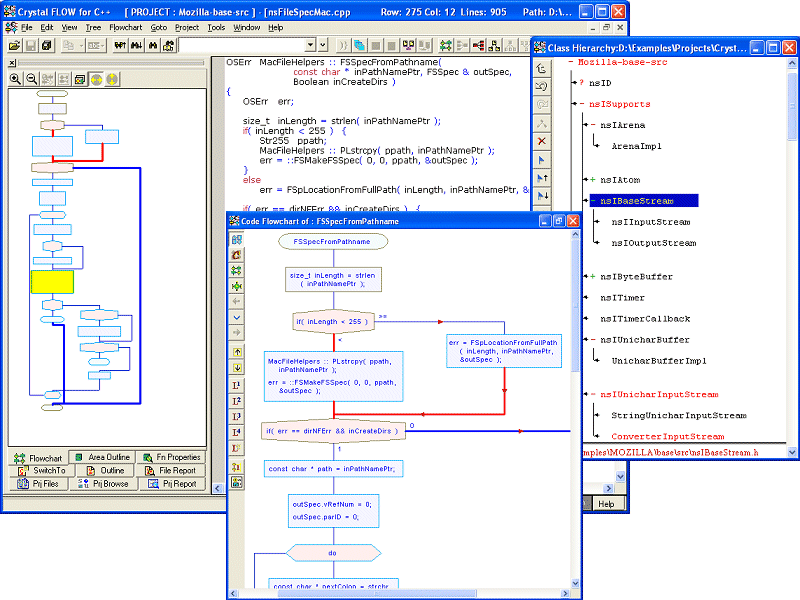
v4.59Basic Edition: Create Flowchart from Source Code. Get a clear view of the code with Flowcharts. You will be up to speed in significantly less time. Automatic-Formatting of Code and Comments. Improved code readability saves time. Export to bmp/jpg/visio, state/transition diagrams, custom-shapes for function-calls,Class-hierarchy Docs Edition: Comprehensive HTML docs with flowcharts, trees,Software Metrics
Description
Understand Code in Less Time Create Flowchart from Source Code. Get a clear view of the code with Flowcharts.
Inherited legacy code? A new member of the team?
You will be up to speed in significantly less time. Verify correctness of function logic.
Detect errors. Use Flowcharts for faster Code-reviews.
Multiple flowchart flavors – level, optimal, loop and conditions, area wise. Code & Flowchart Synchronization while browsing Comment flowcharts for a wider audience.
Export flowcharts to BMP/JPEG/VISIO formats. Code-only, Comment-only and Code+Comment flowcharts.
Print large flowcharts in a single page. Code is Easy-to-read: Auto-Formatting of Code and Comments.
Not just indenting and line wrapping. Line up object-names in successive declarations.
Line up assignment operators in assignments. Split and indent long expressions as per operator precedence Transform hard-to-read code into very readable code.
Improved code readability. Detect errors easily Other features Rich Call/Caller Trees, Class Trees, Include/Include By Trees, Paths - Function/File/Class/Project Level, lPremium Code/Comment Browsing Project Level - Word/Object/Modified Object/Regular Expression/Lexical Search Software Metrics - McCabes, Halstead HTML documents -source+comments (Javadoc like!).
No need to maintain documents - just comment the code using Crystal REVS editions. Cross-reference for all identifiers, Color Coded Metrics.
Import VC++. Visual Studio.Net, Borland projects Language Extensions, Keil Compiler Support SCC Integration Editions: DataFlow: Rich Trees, Object DataFlows, CallFlows, Flowchart inline expansion, Add-On - document generation Docs: Comprehensive docs with flowcharts, Trees, Source Code & full browsing.
Professional: Features of all editions + Rich Trees, Object/Stack Size, Data Dependency, Custom Symbols, Source Code Publisher, Batch output; Add Ons -> Document Generation, Command Line Mode
Inherited legacy code? A new member of the team?
You will be up to speed in significantly less time. Verify correctness of function logic.
Detect errors. Use Flowcharts for faster Code-reviews.
Multiple flowchart flavors – level, optimal, loop and conditions, area wise. Code & Flowchart Synchronization while browsing Comment flowcharts for a wider audience.
Export flowcharts to BMP/JPEG/VISIO formats. Code-only, Comment-only and Code+Comment flowcharts.
Print large flowcharts in a single page. Code is Easy-to-read: Auto-Formatting of Code and Comments.
Not just indenting and line wrapping. Line up object-names in successive declarations.
Line up assignment operators in assignments. Split and indent long expressions as per operator precedence Transform hard-to-read code into very readable code.
Improved code readability. Detect errors easily Other features Rich Call/Caller Trees, Class Trees, Include/Include By Trees, Paths - Function/File/Class/Project Level, lPremium Code/Comment Browsing Project Level - Word/Object/Modified Object/Regular Expression/Lexical Search Software Metrics - McCabes, Halstead HTML documents -source+comments (Javadoc like!).
No need to maintain documents - just comment the code using Crystal REVS editions. Cross-reference for all identifiers, Color Coded Metrics.
Import VC++. Visual Studio.Net, Borland projects Language Extensions, Keil Compiler Support SCC Integration Editions: DataFlow: Rich Trees, Object DataFlows, CallFlows, Flowchart inline expansion, Add-On - document generation Docs: Comprehensive docs with flowcharts, Trees, Source Code & full browsing.
Professional: Features of all editions + Rich Trees, Object/Stack Size, Data Dependency, Custom Symbols, Source Code Publisher, Batch output; Add Ons -> Document Generation, Command Line Mode
File Size
14.19 MB
License
Shareware $49
Latest Update
11 May 2009
Publisher
SGV Sarc Inc