ChiliBurner
v3.3ChiliBurner is the best way to save, share and enjoy your data and home video and audio masterpieces on CD and DVD. - Make data CD or DVD discs with any content. - Burn Music CDs from audio files of M...
Description
Movavi ChiliBurner is the most complete burning solution to create, copy and backup DVDs, CDs, VCDs and SVCDs. Use it for burning CDs and DVDs to share, back up and copy any of your data, audio or video files.
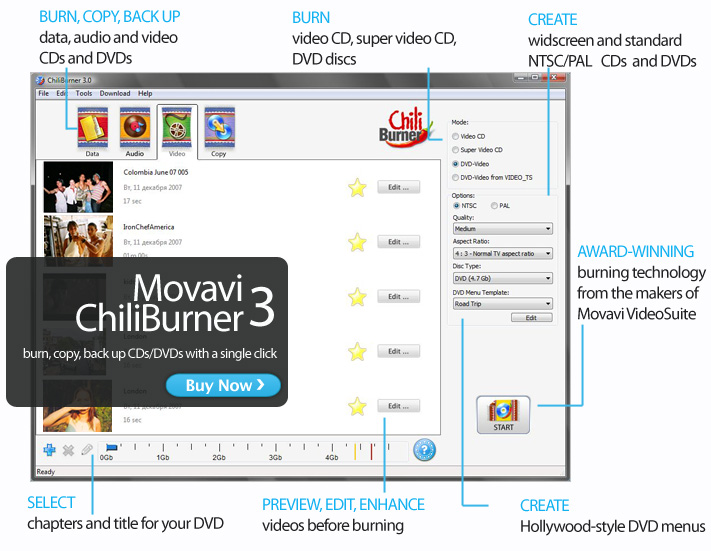
Here's just a taster of what you can do with ChiliBurner: - Create CDs and DVDs with any type of content - data, audio or video. - Burn audio CDs from MP3, WMA, and WAV originals.
- Create VCDs, SVCDs and DVDs in all popular video formats: AVI, MPEG, MOV, WMV, ASF, and more. - Add files directly from Windows Explorer with the easy-to-use drag-and-drop interface.
- Preview your videos before burning. - Edit your videos before burning: cut or split video, add filters, transitions and special effects.
- Apply the Magic Enhance filter to your video to dramatically improve the quality before burning. - Add chapters and titles to your DVDs.
- Choose from more than a dozen static and animated templates to create a professional-looking DVD menu that grabs your viewers' attention. - Download more DVD-menu templates for FREE.
- Copy, back up and save files from CDs or DVDs to your computer's hard disk.
Here's just a taster of what you can do with ChiliBurner: - Create CDs and DVDs with any type of content - data, audio or video. - Burn audio CDs from MP3, WMA, and WAV originals.
- Create VCDs, SVCDs and DVDs in all popular video formats: AVI, MPEG, MOV, WMV, ASF, and more. - Add files directly from Windows Explorer with the easy-to-use drag-and-drop interface.
- Preview your videos before burning. - Edit your videos before burning: cut or split video, add filters, transitions and special effects.
- Apply the Magic Enhance filter to your video to dramatically improve the quality before burning. - Add chapters and titles to your DVDs.
- Choose from more than a dozen static and animated templates to create a professional-looking DVD menu that grabs your viewers' attention. - Download more DVD-menu templates for FREE.
- Copy, back up and save files from CDs or DVDs to your computer's hard disk.