CA
CannedResponses
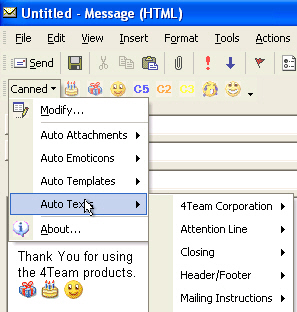
v1.9.1Microsoft Outlook addin integrated to email toolbar that significantly simplifies the process of sending numerous or repetitive email. Create Canned Text, email Templates, Attachments/Documents, Messenger like Emoticons (smiles), organize it all in Subfolders/Submenus, and make your professional personalized email response in just few clicks. Assign a "Hot" button to Canned and access it from the items toolbar: email, tasks, appointments, notes.
Description
CannedResponses is well integrated in Microsoft Outlook and an easy to use add-on that significantly simplifies the process of sending numerous or repetitive email. Create Canned Text, email Templates, Attachments/Documents, Messenger like Emoticons, organize it all in Subfolders/Submenus, and make your professional personalized email response in just few clicks.
Assign a "Hot" button to Canned and access it from any Outlook items toolbar: email, tasks, appointments, and notes. You can create your templates and email responses in the way you are used to work with Microsoft Office.
Use "Canned" in all Outlook forms: tasks, appointments, and notes. The program is very useful for help desks and busy persons and helps spend less time writing Email and shares your "canned" experience with your team.
This is a fantastic addition to current email capability and a perfect email toolbar for active email users. Planned, but not released features: standard Outlook email templates, Picture Stamps, automatic templates, Pre-Addressed Templates, Reply with preprogrammed Templates.
Assign a "Hot" button to Canned and access it from any Outlook items toolbar: email, tasks, appointments, and notes. You can create your templates and email responses in the way you are used to work with Microsoft Office.
Use "Canned" in all Outlook forms: tasks, appointments, and notes. The program is very useful for help desks and busy persons and helps spend less time writing Email and shares your "canned" experience with your team.
This is a fantastic addition to current email capability and a perfect email toolbar for active email users. Planned, but not released features: standard Outlook email templates, Picture Stamps, automatic templates, Pre-Addressed Templates, Reply with preprogrammed Templates.
File Size
4.81 MB
License
Shareware $14.95
Latest Update
10 Jun 2004
Publisher
Sergej Klimuk