AL
Alvas.FileControls
v3.0Alvas.FileControls is a collection of 100% native CLR compliant controls written in C#. Collection allows C# and VB.Net developers to operate with files without writing code. Enough to place ExplorerTreeView and ExplorerListView on the form to get the possibilities of Windows Explorer in your applications... Requirements: .Net Framework v1.1 or later Recommended: .Net Framework with Visual Studio .Net 2003 or later.
Description
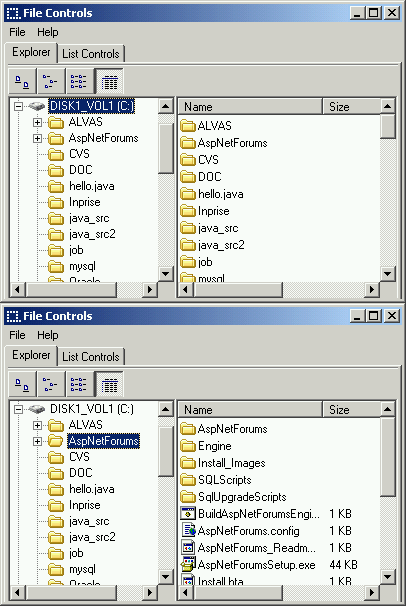
Alvas.FileControls (Windows.Forms) is a collection of 100% native CLR compliant controls written in C#. Collection allows C# and VB.Net developers to operate with files without writing code.
Enough to place ExplorerTreeView and ExplorerListView on the form to get the possibilities of Windows Explorer in your applications... Requirements: .Net Framework v1.1 or later (also .NET 3.5) Recommended: .Net Framework with Visual Studio .Net 2003 or later (also VS.NET 2008) How to use 1 variant 1.
Place ExplorerTreeView, ExplorerListView on the form. 2.
Connect them. 3.
Enjoy. 2 variant 1.
Place DriveComboBox, FolderListBox, FileListBox, FilterComboBox on the form. 2.
Connect them. 3.
Enjoy. Package contains: 1.
ExplorerTreeView is a specialized tree view control that represents folders tree. 2.
ExplorerListView is a specialized list view that lists all the files in a specified directory. 3.
DriveComboBox implements a specialized combo box that displays drives list. 4.
FolderListBox is a specialized list box that represents folders tree. 5.
FileListBox is a specialized list box that lists all the files in a specified directory. 6.
FilterComboBox is a specialized combo box that presents the file filters. 7.
DiskInfo - Shows an information about the disk. 8.
DragFile - allows specified control drag'n'drop files from Windows Explorer. 9.
FileFind - allows to find files entire disk. 10.
PathInfo - shows information about the path.
Enough to place ExplorerTreeView and ExplorerListView on the form to get the possibilities of Windows Explorer in your applications... Requirements: .Net Framework v1.1 or later (also .NET 3.5) Recommended: .Net Framework with Visual Studio .Net 2003 or later (also VS.NET 2008) How to use 1 variant 1.
Place ExplorerTreeView, ExplorerListView on the form. 2.
Connect them. 3.
Enjoy. 2 variant 1.
Place DriveComboBox, FolderListBox, FileListBox, FilterComboBox on the form. 2.
Connect them. 3.
Enjoy. Package contains: 1.
ExplorerTreeView is a specialized tree view control that represents folders tree. 2.
ExplorerListView is a specialized list view that lists all the files in a specified directory. 3.
DriveComboBox implements a specialized combo box that displays drives list. 4.
FolderListBox is a specialized list box that represents folders tree. 5.
FileListBox is a specialized list box that lists all the files in a specified directory. 6.
FilterComboBox is a specialized combo box that presents the file filters. 7.
DiskInfo - Shows an information about the disk. 8.
DragFile - allows specified control drag'n'drop files from Windows Explorer. 9.
FileFind - allows to find files entire disk. 10.
PathInfo - shows information about the path.
File Size
0.29 MB
License
Shareware $297
Latest Update
06 Jan 2006
Publisher
Alvas.Net