AF
AllWebMenus Floating Menus Add-in
v1.0.1Through the Advanced Floating Menus Addin, AllWebMenus (DHTML Menu / JavaScript Menu Maker) adopts a new menu rendering...
Description
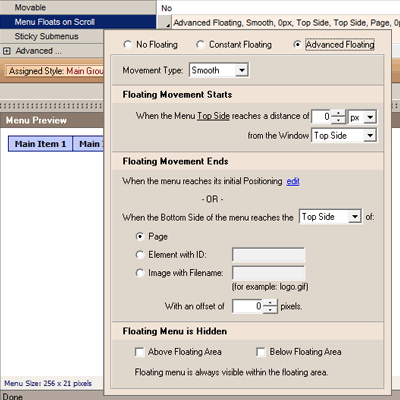
Through the Advanced Floating Menus Addin, AllWebMenus (DHTML Menu / JavaScript Menu Maker) adopts a new menu rendering ability broadening the spectrum of style, effects, use and functionality of your web menus. The AllWebMenus Advanced Floating Menu Add-in is related to the Menu Floats (drifts) on Scroll Main Menu property, which comes with two options: 1.
The "Constant Floating Menu" option (standard), which makes the menu "float" all the way through the page towards the scrolling direction. 2.
The "Advanced Floating Menu" option (through the Add-in), which allows for more customization (such as floating behavior within specific sections of the page) and for different and eye-catching navigation cases within the page. The latter property allows for the following types of floating menus: - Floating Menus: Customized Floating Instead of a constantly floating menu, you can set the menu to float within a specific area of the page.
For example a floating menu can float at the left column of a website within a particular section only. - Floating Menus: Vertical Floating Navigation When a page is very long it results in extensive scrolling, and the reader/user may get confused.
While scrolling, the vertical floating menu has a dual purpose; to point out/highlight the section the user is reading and to give direct links to other sections within the page. - Floating Menus: Floating Navigation Tooltip The purpose of this floating menu is to act like a floating tooltip, an informative box for pointing out/highlighting the section the user is actually reading.
Just like the previos cases, this scenario applies to pages where extensive scroll occurs.
The "Constant Floating Menu" option (standard), which makes the menu "float" all the way through the page towards the scrolling direction. 2.
The "Advanced Floating Menu" option (through the Add-in), which allows for more customization (such as floating behavior within specific sections of the page) and for different and eye-catching navigation cases within the page. The latter property allows for the following types of floating menus: - Floating Menus: Customized Floating Instead of a constantly floating menu, you can set the menu to float within a specific area of the page.
For example a floating menu can float at the left column of a website within a particular section only. - Floating Menus: Vertical Floating Navigation When a page is very long it results in extensive scrolling, and the reader/user may get confused.
While scrolling, the vertical floating menu has a dual purpose; to point out/highlight the section the user is reading and to give direct links to other sections within the page. - Floating Menus: Floating Navigation Tooltip The purpose of this floating menu is to act like a floating tooltip, an informative box for pointing out/highlighting the section the user is actually reading.
Just like the previos cases, this scenario applies to pages where extensive scroll occurs.
File Size
0.34 MB
License
Shareware $25
Latest Update
22 Jun 2008
Publisher
Likno Software