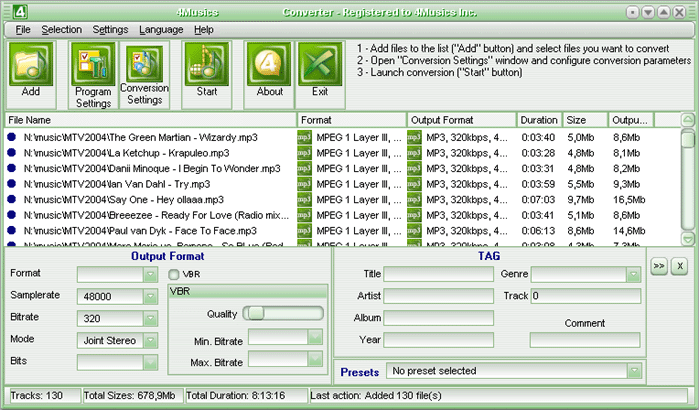
4Musics OGG Bitrate Changer
v4.2Change bitrate of OGG files in one click at high speed! Main Features: converting in one click; high speed; setting resulting; automatic source deleting; drag and drop support; skin support; playlis...
Description
Change OGG bitrate in one click at high speed and quality! The beauty of using 4Musics OGG Bitrate Changer is that it works from the right click menu on a file.
You do not have to invoke a whole other program to change OGG bitrate. Simply right click on the OGG, select "Convert to OGG"! As easy as 1, 2, 3!
What is a OGG? Ogg Vorbis is a fully open, non-proprietary, patent-and-royalty-free, general-purpose compressed audio format for mid to high quality (8kHz-48.0kHz, 16+ bit, polyphonic) audio and music at fixed and variable bitrates from 16 to 128 kbps/channel.
Vorbis is the first of a planned family of Ogg multimedia coding formats being developed as part of Xiph.org's Ogg multimedia project. Features: -converting in one click!
-fast converting speed; -advanced output format settings; -automatic source deleting; -supporting drag and drop; -tag editor; What's new in version 1.5: Improvements: - now all program windows can be attached to Main Window with a help of a special button near a "Close" button; - audio options presets in audio options windows; - new "Add Folder" window with ability to select types of audio files to be added and option for including subfolders; - new option "Save subfolders structure", if you want to save encoded files to another place ("Options" window). Fixed bugs: - crashing at start/exit during load/saving settings; - crashing when many files were added with "Add folder" button; - delays at start and exit; - sometimes settings could not be saved; - sometimes MP3 Options window flied away to the left top screen corner; - program windows were cut off at 120 dpi display settings; - some text strings could not be translated; - bad File List redrawing; - sometimes menubar position could not be saved; - crashing when you press an "Audio" button; - resource overdrawing during the idle time; - incorrect multiple tag editing; - now process window is always on top.
You do not have to invoke a whole other program to change OGG bitrate. Simply right click on the OGG, select "Convert to OGG"! As easy as 1, 2, 3!
What is a OGG? Ogg Vorbis is a fully open, non-proprietary, patent-and-royalty-free, general-purpose compressed audio format for mid to high quality (8kHz-48.0kHz, 16+ bit, polyphonic) audio and music at fixed and variable bitrates from 16 to 128 kbps/channel.
Vorbis is the first of a planned family of Ogg multimedia coding formats being developed as part of Xiph.org's Ogg multimedia project. Features: -converting in one click!
-fast converting speed; -advanced output format settings; -automatic source deleting; -supporting drag and drop; -tag editor; What's new in version 1.5: Improvements: - now all program windows can be attached to Main Window with a help of a special button near a "Close" button; - audio options presets in audio options windows; - new "Add Folder" window with ability to select types of audio files to be added and option for including subfolders; - new option "Save subfolders structure", if you want to save encoded files to another place ("Options" window). Fixed bugs: - crashing at start/exit during load/saving settings; - crashing when many files were added with "Add folder" button; - delays at start and exit; - sometimes settings could not be saved; - sometimes MP3 Options window flied away to the left top screen corner; - program windows were cut off at 120 dpi display settings; - some text strings could not be translated; - bad File List redrawing; - sometimes menubar position could not be saved; - crashing when you press an "Audio" button; - resource overdrawing during the idle time; - incorrect multiple tag editing; - now process window is always on top.